
CAPSTONE PROJECT
ITC571 - Emerging Technologies and Innovation
Security Aspects with Smartphones
This is my second last subject in my Masters of Information Security and after much thought I have chosen smartphone security for my capstone project for the following reasons.
Smartphones are becoming increasingly common across the world and is fast becoming the tool of choice for accessing and storing personal data. Each day this landscape is ever changing with new threats emerging daily. Vendors offer ways to secure information, what are these methods and how easy are these to bypass? How much of this personal information can a savvy computer user access? My research project will attempt to answer some if not all of these questions.
Smartphones are becoming increasingly common across the world and is fast becoming the tool of choice for accessing and storing personal data. Each day this landscape is ever changing with new threats emerging daily. Vendors offer ways to secure information, what are these methods and how easy are these to bypass? How much of this personal information can a savvy computer user access? My research project will attempt to answer some if not all of these questions.
Statement of Innovation
Innovation takes many forms and has the ability disrupt and radicalise the world for the better. New ideas are crucial for innovation to foster but it also requires recognition of opportunities, possibilities and a little bit of entrepreneurship. Studies of innovation have identified techniques such as diffusion, critical thinking and a systematic approach can expedite the process though the ultimate tool for innovation is curious minds.

Project Objectives
The aim of this project is to review existing protection methods and known attack techniques, assess their current relevance and provide recommendations or improvements where applicable in the given project time frame. Project goals are as follows:· Select appropriate topic research
· Provide scope and justification for topic
· Publish a blog portal to track progress
· Conduct research based on methodology and project execution plan
· Innovate where possible
· Conclude and present findings
The project will cover smartphone devices available to the project lead and any tools which are currently available and will assist the research (computers, software, etc.). Hardware maybe acquired depending on its relevancy, availability and time to obtain.
Methodology
Different aspects of smartphone security have been broken down into 5 major areas for ease of research and presentation of findings. Challenges with this method is to holistically cover the subject by finding relevant current research articles for each domain and complete in depth analysis in a timely manner. Research in each area is based on recent recommendations and findings for best practice risk mitigation with smartphones.Risk mitigation and security strategies for smartphones found in existing publications (Samawi, 2016; Symantec Corporation, 2016; Thomas, Beresford, & Rice, 2015) are as follows:
- Use reliable security tools to protector your smartphone from malware
- Only install applications signed from a trusted author and only from trusted sources (Play store / apple app store)
- Use a screen auto-lock and PIN / pattern
- Keep sensitive data off your smartphone where possible
- Perform regular backups
- Pay attention to unexpected phone behavior to identify security breaches
- Use encryption where possible
- Apply updates to smartphone in a timely manner
- Disable blue tooth and wireless services when not in use
- Use remote find and wipe tools
- Don’t jailbreak devices
These recommendations will be considered when researching and reviewing the 5 major areas.

Second generation GSM (2G) provides standard call and phone transmission and uses the A5/1 and A5/2 stream ciphers for encryption. These algorithms use the same key and are subject to the same attacks (Barkan, Biham, & Keller, 2008). Third generation GSM (3G) uses the A5/3 stream cipher. Dunkelman et al. (2014) outlines a sandwich attack where in 78 out of 100 experiments, the decryption key was found (Dunkelman, Keller, & Shamir, 2014).
A vulnerability has been recently discovered in Android's full disk encryption with devices running Qualcomm chip sets. This vulnerability exploits Android’s TrustZone security mechanism allowing the FDE keys to be extracted (HT Syndication, 2016).

Research Overview
Smartphone device attack vectors can be broken down into Wireless sniffing / interception, data exfiltration, passwords and Encryption, Operating Systems and Application security. Further research into these areas will align with project objectives. In the interest of time and quality of review, only a subset of these research areas or other papers may be considered during different project phases.Wireless Sniffing & Interception
2G, 3G, 4G, WIFI 802.11b/g/n, Bluetooth and NFC are common embedded wireless technologies in current smartphone handsets (Apple Inc, 2016; Huawei Technologies, 2016; Samsung, 2016). A selection of research articles identify the following wireless technologies as current vulnerable areas:Second generation GSM (2G) provides standard call and phone transmission and uses the A5/1 and A5/2 stream ciphers for encryption. These algorithms use the same key and are subject to the same attacks (Barkan, Biham, & Keller, 2008). Third generation GSM (3G) uses the A5/3 stream cipher. Dunkelman et al. (2014) outlines a sandwich attack where in 78 out of 100 experiments, the decryption key was found (Dunkelman, Keller, & Shamir, 2014).
Data Exfiltration
With over 70 percent of Android devices running lollipop (5) and kitkat (4) (Reisinger, 2015), Srivastava and Tapaswi’s (2015) logical acquisition method of Android data is worth further reviewing since it covers extracting data from Android Mobile Devices with the use of Android Debugging Bridge (Srivastava & Tapaswi, 2015).Passwords & Encryption
Full disk encryption (FDE) has been available since iOS version 4.0 and Android 2.3.X, which offers end users a sense of security regarding the protection of sensitive information. In the event a smartphone is lost or stolen, the data encryption will play an important role in protecting sensitive data from falling into the wrong hands (Shea, 2015).A vulnerability has been recently discovered in Android's full disk encryption with devices running Qualcomm chip sets. This vulnerability exploits Android’s TrustZone security mechanism allowing the FDE keys to be extracted (HT Syndication, 2016).
Operating Systems
On average 87.7% of Android devices are exposed to at least one of 11 known critical vulnerabilities, most of these vulnerabilities go unpatched due to smartphone manufacturers only releasing 1.26 updates per year (Thomas, Beresford, & Rice, 2015). Höbarth & Mayrhofer (2011) has presented a framework to exploit vulnerabilities in Android to grant elevated access.Application Security
Smartphones produce personal information about the user for example location, usage and history information. These sensitive pieces of data are often collected from the operating system or the applications in order to support their functionality requirements (Tsavli, Efraimidis, Katos, & Mitrou, 2015).
Google play and Apple app stores police applications for malicious content before signing with their digital authority for user download and use. This method works generally works well with the odd malicious application getting through their checks (Mansfield-Devine, 2014). Some apps are granted more permissions than required which is a key issue for the protection of personal data on smart devices. When applications request access to personal information it should be clearly stated if this data will be used only within computations on the device or transmitted externally (Tsavli, Efraimidis, Katos, & Mitrou, 2015).
Incorrect use of SSL in applications and inconsistent implementation of APIs in various libraries leaves applications vulnerable. SSL Pinning is a technique that allows developers to protect the application from Man-in-the-Middle (MITM) attacks however, research has found 41 of 100 audited applications using SSL were still vulnerable to MITM attacks (Tendulkar & Enck, 2014). MITM attacks are where an adversary eavesdrops on personal information in transit or modifies the contents of passing data. This attack can be mitigated by using Transport Layer Security (TLS) or Secure Sockets Layer (SSL) which is an internet defacto standard for securing communications.
Project Plan

Ethical Analysis
Can be found at the following URL
Conclusion (Video to be posted post presentation)

Weekly Progress Reports
Week No: 2
Date: 18 July 2016
Planning: topic selection
Milestone: no
Planned: on time
Comments: With so many cutting edge topics its quite difficult to identify what topic should be selected for a major project. Reviewing the subject outline and week 1's material has helped to identify the project flow and how to structure learning and work methods. The plan is to cast the net wide to ensure creativity with the most possibilities and refine a subject on a fitting topic.
Smartphone SecuritySecurity aspects with smartphones- M2M / IT Automation
- Artificial Intelligence
Issues: So many topics to choose from and not sure what is the best scope for a good capstone project
Action/Results Finished (Y/N):
Next Steps: Continue to refine topic selection and work on defining a winning scope for the project. Do some research / search for papers / journals to get a feel for current research on possible topics.
Week No: 3
Date: 25 July 2016
Planning: topic selection
Milestone: yes
Planned: on time
Comments: After conversations with Mohsin (Subject coordinator) and providing my ideas around different topics we have concluded on a topic of "Security aspects with smartphones". I did some initial searches for different papers and articles and there is many different domains around smart phone security. For example the journal article Security Threats on Mobile Devices and their Effects: Estimations for the Future shows different threats to mobile operating systems

http://www.sersc.org/journals/IJSIA/vol10_no2_2016/2.pdf
Or looked at another way the functions and services of a mobile device. I think there is plenty of areas to review literature for smartphone security aspects.At least I have a topic to move forward on, hopefully its the right one. Time will tell!

Issues: Probably the biggest issue will be narrowing it down to the key/relevant areas given the project time frame.
Action/Results Finished (Y/N):
Next Steps: I've also moved my various topics down to the week 2 blog post so I can keep the main section up to date with relevant information (Homer and Marge can stay there for now). Now to that the topic is selected I need to put together my project proposal and project plan.
Week No: 3
Date: 28 July 2016
Planning: project proposal & project plan
Milestone: no
Planned: on time
Comments: So after the second online meeting Mohsin advised that the assessment item 2 due date has been moved to the 8th of August (originally 1st of August) which is great since after reading the sample funded research proposals, sample assignments and given its 1500 - 2000 words I think ill need the extra days! There appears to be a lot of research gone into the topics since there is a lot of citation I think i need to do a lot of paper / article reading on smartphone security aspects and try to get an idea of current research / innovation. Not to mention start writing the assessment item, slightly overwhelmed right now!
Issues: A lot of reading, a lot of writing, a lot of uncertainty. Not much time to do it in!
Action/Results Finished (Y/N):
Next Steps:

Week No: 4
Date: 1 August 2016
Planning: project proposal & project plan
Milestone: sort of
Planned: on time
Comments: So I thought id start with the easy / fun stuff - the project plan. Since I've used MS project plenty of times in the past I thought id try something new and use some of the other products listed. Lets start with the ones I didn't use:
- Microsoft Project Pro (been there done that)
- OpenProject (seemed to be SaaS / not easy to sign up or you could install on Linux - didnt exactly want to spend too much time getting the software installed and running)
- openproj (kinda got a bit confused if it was the same product as others - very similar to Project Libre - though it has binaries for all OS's, probably the only one to really run on OSX though there are binaries for all operating systems)
And now the ones I did use:
- Open Project / Project Libre (not bad though i found some of the line items wouldn't shift where i wanted them too and thought id give GanttProject a go)
- GanttProject (seemed to be pretty good - had a web export function if i wanted to publish it as a website also seemed reasonably intuitive)
Conclusion: You can probably see my PERT chart above which seemed to come together well. I've got the usual project WBS I can stick in my proposal so I'll probably stick with GanttProject and see how it goes.
Issues: No real issues, just time to look into the different applications
Action/Results Finished (Y/N):
Next Steps: MAKE A START ON THE PROPOSAL!!
Week No: 4
Date: 2 August 2016
Planning: project proposal & project plan
Milestone: no
Planned: on time
Comments: First draft of abstract written for project proposal and handy URLs for future reference / review
http://security.samsungmobile.com/smrupdate.html
https://support.apple.com/en-au/HT201222
https://cve.mitre.org
https://www.cvedetails.com/top-50-products.php
https://play.google.com/store/apps/details?id=uk.ac.cam.deviceanalyzer&hl=en
http://androidvulnerabilities.org/
Issues:
Action/Results Finished (Y/N):
Next Steps:
Week No: 4
Date: 4 August 2016
Planning: project proposal & project plan
Milestone: no
Planned: on time
Comments: Lots of searching for current and relevant articles. Also reviewed the sample project plans and previous sample assignments. Noticed that previous assignments seem very academically written, where the sample project plans seem more like a normal proposal - not sure exactly which one is preferred. The subject outline appears to be leaning along the lines of the sample project plans.
Positive note I have managed to collate enough research papers to complete remaining sections of proposal
Issues: Trying to identify what is the best layout for the project proposal. Will probably stick to what I am use to with day to day work proposals.
Action/Results Finished (Y/N):
Next Steps: Identify methodology flow and draft out the remaining project plan
Week No: 4
Date: 7 August 2016
Planning: project proposal & project plan
Milestone: yes - assignment submission
Planned: on time
Comments: writing, revising, writing, revising, writing, revising, revising, SUBMISSION!
After much effort assignment 2 has been completed in range of the 1500 - 2000 word count. Many interesting research topics identified for presentation - mainly around the android platform. Managed to break down the methodology / research into the following areas:
- Wireless Sniffing & Interception
- Data Exfiltration
- Passwords & Encryption
- Operating Systems
- Application Security
Issues: Nothing major apart from a lot of time and lack of sleep :)
Action/Results Finished (Y/N):
Next Steps: Have a quick breather and then into the annotated bibliography
Week No: 5
Date: 12 August 2016
Planning: annotated bibliography
Milestone: no
Planned: on time
Comments: Fleshed out a template annotated biography using a bunch of references from the project proposal
Currently reading up on the best way to present the document and structure my responses.
Issues: Trying to work out if we use the existing research papers from the project proposal or if we should be using new ones. Makes sense to use the ones from the project proposal since they were the background of the gaps / research.
Action/Results Finished (Y/N):
Next Steps: Hopefully receive more clarification on research papers to use in annotated bibliography and start to draft the document
Week No: 6
Date: 15 August 2016
Date: 15 August 2016
Planning: annotated bibliography
Milestone: no
Planned: on time
Comments: Clarification received to use existing articles and new/additional ones. Completed a draft of 4 articles and been scanning through PRIMO and google scholar reading and reviewing a heap of different papers covering various aspects of smartphone security. Will continue to research papers before culling the list to 12
Issues: Identifying the best articles for the bibliography, many different articles to choose from and hard to know exactly when enough articles are reviewed before selecting the best.
Action/Results Finished (Y/N):
Next Steps: Continue to research articles before making final shortlist.
Week No: 6
Date: 20 August 2016
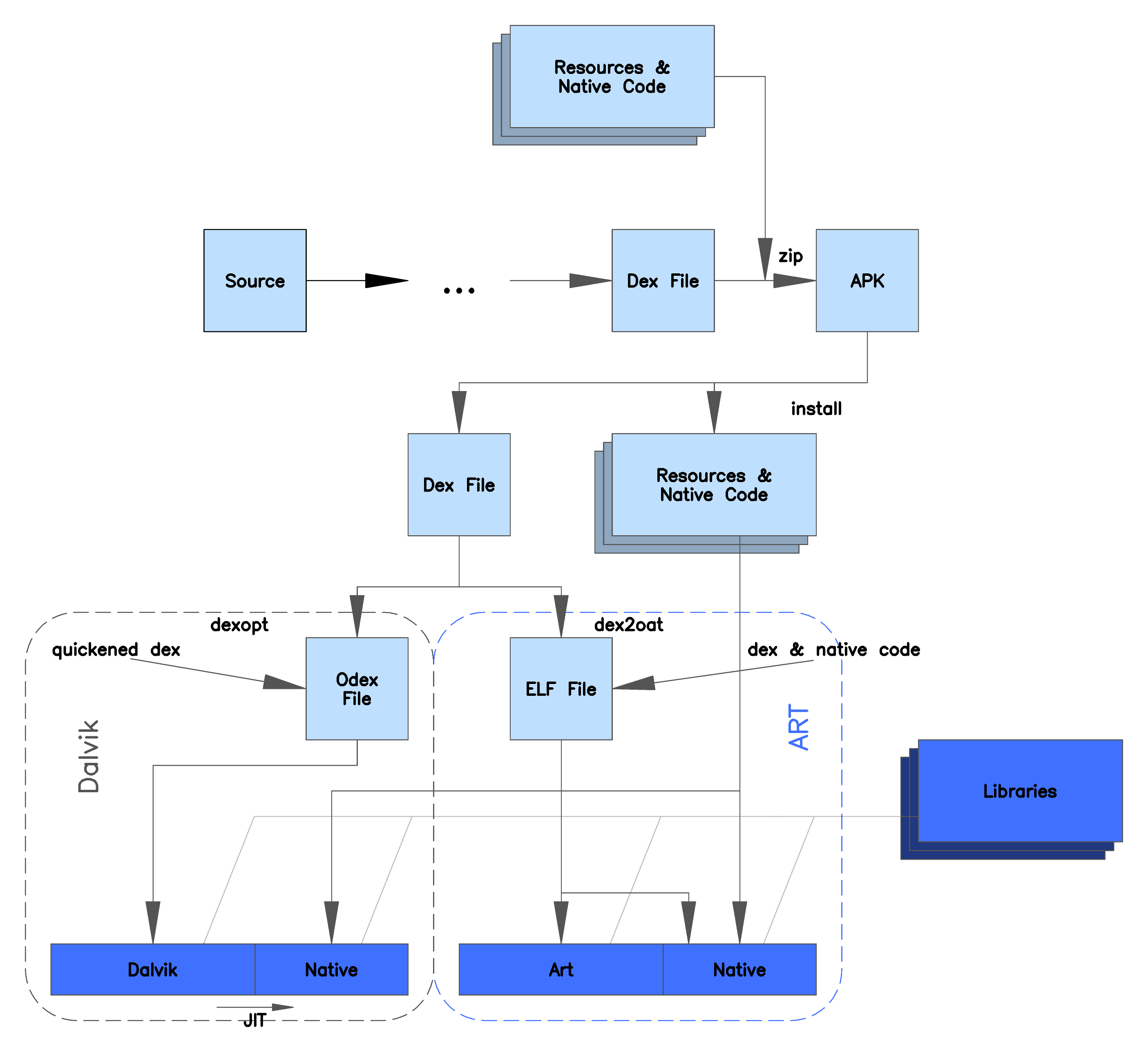
Android prior to 4.4 runs Dalvik virtual machine for applications. Interesting that such a portable device has implemented virtualisation. Further reading on this Dalvik has the .dex extension and was superseeded by Android runtime (ART) post Android 4.4. A comparison of the 2 are listed below courtesy of wikipedia:
Date: 20 August 2016
Planning: annotated bibliography
Milestone: no
Planned: on time
Comments: Up to 10 articles reviewed / annotated. Continuing research for different papers to make the final 2. Trying to find papers which cover different aspects of the 5 documented areas for smartphone security. Some interesting finds include the following:
Logical Acquisition tools
- ADB (Android debugging bridge - used for developers to debug their applications)
- AF Logical (Android forensic software)
Rooted Android applications from Fdroid repository. Taintdroid tracks how apps use sensitive information required integrating our software into the Android platform at a low level
Issues: Finalising the last couple articles to ensure the best papers are presented
Action/Results Finished (Y/N):
Next Steps: Finalise remaining articles and finish first draft of annotated bibliography
Week No: 7
Date: 28 August 2016
Date: 28 August 2016
Planning: annotated bibliography
Milestone: no
Planned: on time
Comments: Finished first draft of annotated bibliography and created Turnitin account using details in the discussion forums. Submitted the draft for Turnitin report and currently considering the questions listed in http://www.academicinternational.org/teaching/turnitin.pdf
Issues: Nothing worth mentioning
Action/Results Finished (Y/N):
Next Steps: Get annotated bibliography, Turnitin report and questions finished for submission
Week No: 9
Date: 30 August 2016

Date: 30 August 2016
Planning: annotated bibliography
Milestone: yes
Planned: on time

Comments: STEAMING ALONG NOW. Managed to finalise annotated bibliography, Turnitin report and questions in the last couple of days. Just going to review and sit on it up until the due date before submitting. The Research Development Quiz was released last night and after much reading of topics and resources in interact to prepare for the exam I have successfully ticked that off the list.
After some consideration I think I need to update the body of this page to reflect the current work completed. Also next step is to complete the Ethical Analysis. I've chosen the below 2 topics which I plan on posting to the forum once they are completed for review/comment.
Finally contemplating for the Project Blog and Seminar and how to deliver a good presentation. Ideas are looking for smartphone security aspects from reviewed articles to test and present findings. See how we go.
Issues: No issues, tracking ahead of time!
Action/Results Finished (Y/N):
Next Steps: Review / Submit Assessment item 3, make a start on the Ethical Analysis, update blog with current findings/work and start considering how to present a good final presentation.
Week No: 9
Date: 6 Sep 2016
Planning: assignment 4 ethics
Milestone: no
Planned: on time
Comments: Finished ethics quiz and picked my two topics below. I have some ideas regarding layout and flow so will look to start putting something together.
Where has all the data gone? Service providers capturing metadata;
Do individual rights and the common good conflict?
Went looking for the review literature "Justice: What's the Right Thing to Do? - Michael J. Sandel" which I ended up finding here. Looks like a lengthy read but most well start while waiting for the official release in the discussion forums.
Issues: Identifying layout of document and waiting to get the review literature. Not sure if the one I found is the same as what will be published
Action/Results Finished (Y/N):
Next Steps: Finish reading Justice: What's the Right Thing to Do? - Michael J. Sandel and finalise my ethics review topics.Week No: 10
Date: 13 Sep 2016
Planning: assignment 4 ethics
Milestone: yes
Planned: on time
Comments: Published my ethical analysis to the forum. Turns out the book I was reading was the same as what was published to the forum which is great considering i spent a few hours reading the one i found online. Though I have to say it is quite an interesting read. Glad I have already done the ITC506 ethics subject which I can put my learnings to good use :)


Above is my rationale for each ethical analysis. I have chosen examples which cover the individual ethical issue but related to the next to allow for decent flow. Personal thoughts on metadata retention via service providers is that they are not really different to the intent of the original telecommunications interception act which has stood since 1979. People fear what they do not completely understand and the intent may not be very clear since the politicians did not do a great job of clearly explaining the legislation. With that aside over time i think it will become widely accepted providing that is it not misused or abused.
Now just to wait for comments / feedback / other ethical analysis' I can review.
Issues: nothing which comes to mind
Action/Results Finished (Y/N):
Next Steps: Provide feedback to other students analysis and comment / discuss my own. Also start looking at the presentation requirements.Week No: 11
Date: 23 Sep 2016
Planning: assignment 5 and 6
Milestone: no
Planned: on time
Comments: Finally got around to updating the blog content for the project plan and information out of each assignment which gives the blog more context on what the project is about. Blog is current apart from up and coming project seminar. Now to putting together the project presentation. Once this is finished I will post the final blog entry with finding and maybe even a video link depending on how the presentation goes.
Issues: More considerations rather than issues:
- Identifying what content to put into the presentation
- Possibility look at doing some external research for further smartphone security interest
- Work out best way to put presentation together
- Present and close blog with posting lessons learnt and/or an evaluation of the project outcomes
Action/Results Finished (Y/N):
Next Steps: Complete presentation and present to course co-coordinator / groupWeek No: 12
Date: 01 Oct 2016


root@kali:~# adb devices
 2. Using root kit software / application
This method allows the use of the existing OEM ROM but may stop you from receiving updates.
- Download a root kit (e.g. KingRoot or Towelroot) apk.
- Enable unknown sources to install apk Settings --> Applications --> Unknown Sources
- Install and run apk to gain root access
root@kali:/run/user/0/gvfs/mtp:host=%5Busb%3A003%2C006%5D/Internal storage# ls
360Panoramas Facebook Messenger Movies Pictures
Alarms Hewlett-Packard Music Podcasts
Albums HTC_READ_ACM_DATA_FILE My Documents Ringtones
Android HTCSpeakData _nero_sync SoundCloud
com.facebook.orca HTC_WRITE_ACM_DATA_FILE nmdsdcid WhatsApp
DCIM media Notifications
Download mobile Photaf
To actually gain access to data on my android handset the phone needed to be unlocked using PIN/swipe and settings enabled (enable developer mode and USB debugging). If you have access to the PIN/swipe and physical devices, then you already have access to the phone data without having to use adb or similar tools. To do this without knowing the PIN or swipe the most likely method would be brute forcing the PIN/swipe using something like a USB rubber ducky or an exploit like this. Both of these methods are fixed Android 5 and above by wiping the device after 30 incorrect attempts and Android update patches.
If remote access to the device was needed it would need to be using a root kit option. This method still requires a user to install a dodgy app which should be mitigated by the play store or app store application screening security checks. Xcodeghost, YiSpecter and Godless are examples of malware which can circumvent these security checks by only downloading the malware payload after being installed.
Date: 01 Oct 2016
Planning: assignment 5 and 6
Milestone: no
Planned: on time
Comments: I decided to do further research on a couple of articles reviewed in the annotated biography. This post is the findings from the paper:
Srivastava, H., & Tapaswi, S. (2015). Logical acquisition and analysis of data from android mobile devices. Information and Computer Security, 450-475.
The paper looks do to logical data acquisition of android 2 - 4 versions. Given that my Android phone is version 5 lollipop the process using adb may be slightly different
So after some research the following process was used to probe my android 5 device with adb using a kali linux test machine:

root@kali:~#apt-get install adb fastboot adb-sdk android
On the android device enable developer mode (tap 7 times)
under developer options tick the box "enable USB debugging". Once this is selected the phone with appear in adb


List of devices attached
HT464W901418 device
Using adb shell it is possible to get user level access to android's system files, however this appears to be limited in what can be accessed.
2|shell@m7:/ $ id
uid=2000(shell) gid=2000(shell) groups=1004(input),1007(log),1011(adb),1015(sdcard_rw),1028(sdcard_r),3001(net_bt_admin),3002(net_bt),3003(inet),3006(net_bw_stats) context=u:r:shell:s0
shell@m7:/ $ ls /data
opendir failed, Permission denied
Root access or a "rooted" phone is required to get full access to all android files. After further research, root access can be achieved in 2 ways - installing a custom ROM and using root kit software / application.
1. Installing a custom ROM
This method apprarently can void your phone warranty and may stop you from receiving updates. It requires and unlocked bootloader, flashing the smartphone with a custom ROM and installing root software. More information on this can be found here
 2. Using root kit software / application
This method allows the use of the existing OEM ROM but may stop you from receiving updates.
- Download a root kit (e.g. KingRoot or Towelroot) apk.
- Enable unknown sources to install apk Settings --> Applications --> Unknown Sources
- Install and run apk to gain root access
Issues:
If my phone was locked (PIN protected) the computer could not read the internal storage from the Android handset.
If i unlocked the handset when connected to the computer I could access the contents of the SD card (/sdcard) however this was a subset of data available through adb
If my phone was locked (PIN protected) the computer could not read the internal storage from the Android handset.
If i unlocked the handset when connected to the computer I could access the contents of the SD card (/sdcard) however this was a subset of data available through adb
root@kali:/run/user/0/gvfs/mtp:host=%5Busb%3A003%2C006%5D/Internal storage# ls
360Panoramas Facebook Messenger Movies Pictures
Alarms Hewlett-Packard Music Podcasts
Albums HTC_READ_ACM_DATA_FILE My Documents Ringtones
Android HTCSpeakData _nero_sync SoundCloud
com.facebook.orca HTC_WRITE_ACM_DATA_FILE nmdsdcid WhatsApp
DCIM media Notifications
Download mobile Photaf
To actually gain access to data on my android handset the phone needed to be unlocked using PIN/swipe and settings enabled (enable developer mode and USB debugging). If you have access to the PIN/swipe and physical devices, then you already have access to the phone data without having to use adb or similar tools. To do this without knowing the PIN or swipe the most likely method would be brute forcing the PIN/swipe using something like a USB rubber ducky or an exploit like this. Both of these methods are fixed Android 5 and above by wiping the device after 30 incorrect attempts and Android update patches.
If remote access to the device was needed it would need to be using a root kit option. This method still requires a user to install a dodgy app which should be mitigated by the play store or app store application screening security checks. Xcodeghost, YiSpecter and Godless are examples of malware which can circumvent these security checks by only downloading the malware payload after being installed.
Action/Results Finished (Y/N):
Data ex-filtration is possible using physical and remote methods, however good security practice such as using a PIN/swipe and avoid downloading and installing random applications can counter this. No zero day type exploits were identified when researching this topic.
Week No: 12
Date: 02 Oct 2016
After some research I identified I would be able to use the following equipment and software to launch a MITM lab:
Date: 02 Oct 2016
Planning: assignment 5 and 6
Milestone: no
Planned: on time
Comments: The next paper review was:
Tendulkar, V., & Enck, W. (2014). An Application Package Configuration Approach to Mitigating Android SSL Vulnerabilities. Computer Science - Cryptography And Security.
I decided to look into if SSL verification and "failing to verify either the certificate or the hostname enables Man-in-the-Middle (MITM) attacks" is still relevant in today's smartphone applications.


After some research I identified I would be able to use the following equipment and software to launch a MITM lab:
- Raspberry pi
- WLAN adapter
- Raspbarian
- hostapd and sslsplitter software

Raspberry pi configuration
The WIFI access point configuration used was based on this document. After devices could connect to the WIFI network SSLsplit was configured to do the SSL interception and certificate replacement. Once SSLsplit was tested working, it was time to test to see if some popular applications were able to identify that the SSL / encrypted information was being intercepted.

Testing
Popular smartphone apps were tested to see if they were pinning a specific SSL certificate in the application. If the app did not identify an error than it was presumed no SSL certificate inspection was taking place and the app was SSL authority unaware. Testing was completed using a HTC M8 smartphone running Android 5.0.2 with the latest applications downloaded from the Google Play store.
The following applications were SSL aware and knew that the certificate being loaded from the server was invalid.
- Gmail
- Play store
- ANZ banking app
- Citi banking app
- Bank of Queensland banking app
- National Australia Bank banking app
- Newcastle Permanent banking app


Issues:
Surprisingly the following banking applications did not complain that the certificate being presented was not correctly signed/authorised.
- Commonwealth banking app
- Westpack banking app
- ING Direct banking app
- Suncorp banking app
Given that without an account to test logging in further checks and balances may apply, though since no check has been done prior to entering user credentials it was assumed that no further SSL checks would be done.


Action/Results Finished (Y/N):
It appears that there are still smartphone apps which do not pin certificates or validate a certificate chain which is concerning especially for banking applications
Week No: 12
Date: 04 Oct 2016
 The following was used to install and configure tools to use the RTL2832U receiver:
root@kali:~#apt-get install gnuradio gnuradio-dev
root@kali:~#apt-get install rtl-sdr librtl-sdr-dev
root@kali:~#apt-get install osmo-sdr libosmosdr-dev
root@kali:~#apt-get install libosmocore libosmocore-dev
root@kali:~#apt-get install libusb-1.0.0 libusb-dev
root@kali:~#apt-get install cmake libboost-all-dev libcppunit-dev swig doxygen liblog4cpp5-dev python-scipy
root@kali:~#apt-get install libgnuradio-osmosdr0.1.4 gqrx

kal was installed and configured using this guide to identify GSM channels for local providers

root@kali:~#cd ~/src
root@kali:~#sudo apt-get install libtool autoconf automake libfftw3-dev
root@kali:~#git clone https://github.com/asdil12/kalibrate-rtl.git
root@kali:~#cd kalibrate-rtl
root@kali:kalibrate-rtl#./bootstrap
root@kali:kalibrate-rtl#./configure
root@kali:kalibrate-rtl#make
root@kali:kalibrate-rtl#sudo make install
Once channels were identified airprobe and wireshark were used to identify information on each tower
root@kali:~#wireshark
root@kali:~#airprobe_rtlsdr.py
The following towers were identified on the following frequencies:
942000000 | 940150000 | 940060000 | 938675000 AU/TELSTRA/CELL (LAI: 505/01/4194)
944700000 | 943900000 AU/OPTUS/CELL (LAI: 505/02/2602) and 944300000 (LAI: 505/02/2602)
953805000 | 960605000 AU/VODAFONE/CELL (LAI: 505/03/2061)


Issues: So the next step is to identify my phone on the network. This guide provided a good background understanding on how GSM works and how to identify your phone on the network or your temporary mobile subscriber identity (TMSI). The TMSI can apparently be pulled from the SIM card if you are able to talk to your phone like a serial modem which unfortunately my smartphone does not support (or any other phones I have access to).
You also need your kc or decryption key to decode your messages. This can also be done querying your phone as a serial modem using the guide above. Another option is using a SIM card reader (also purchased on ebay) and the SIM scan application. I've unsuccessfully tried to extract my TMSI and ki using the SIM scan application which came with the SIM card reader. Additionally I have tried to use a Telstra Aircard 320U 4G card as a serial modem using the AT commands listed in the above guide with no luck.


Date: 04 Oct 2016
Planning: assignment 5 and 6
Milestone: no
Planned: on time
Comments: The following papers suggests that A5/1 & A5/2 have protected GSM privacy for the last 20+ years and that the ciphers are proven to be cryptographically weak.
Dunkelman, O., Keller, N., & Shamir, A. (2014). A Practical-Time Related-Key Attack on the KASUMI Cryptosystem Used in GSM and 3G Telephony. Journal of Cryptology, 824-849.
After some research I decided to see if I can decrypt GSM traffic from my smartphone using inexpensive hardware. I settled on the software defined radio - DVB-T SDR+DAB+FM HDTV Tuner Receiver RTL2832U+R820T2 which can be found easily on ebay for about 10 bucks.
 The following was used to install and configure tools to use the RTL2832U receiver:
root@kali:~#apt-get install gnuradio gnuradio-dev
root@kali:~#apt-get install rtl-sdr librtl-sdr-dev
root@kali:~#apt-get install osmo-sdr libosmosdr-dev
root@kali:~#apt-get install libosmocore libosmocore-dev
root@kali:~#apt-get install libusb-1.0.0 libusb-dev
root@kali:~#apt-get install cmake libboost-all-dev libcppunit-dev swig doxygen liblog4cpp5-dev python-scipy
root@kali:~#apt-get install libgnuradio-osmosdr0.1.4 gqrx
Once installed gqrx was used to confirm the card was working correctly and could identify signals on various bands of the spectrum

kal was installed and configured using this guide to identify GSM channels for local providers

root@kali:~#cd ~/src
root@kali:~#sudo apt-get install libtool autoconf automake libfftw3-dev
root@kali:~#git clone https://github.com/asdil12/kalibrate-rtl.git
root@kali:~#cd kalibrate-rtl
root@kali:kalibrate-rtl#./bootstrap
root@kali:kalibrate-rtl#./configure
root@kali:kalibrate-rtl#make
root@kali:kalibrate-rtl#sudo make install
Once channels were identified airprobe and wireshark were used to identify information on each tower
root@kali:~#wireshark
root@kali:~#airprobe_rtlsdr.py
The following towers were identified on the following frequencies:
942000000 | 940150000 | 940060000 | 938675000 AU/TELSTRA/CELL (LAI: 505/01/4194)
944700000 | 943900000 AU/OPTUS/CELL (LAI: 505/02/2602) and 944300000 (LAI: 505/02/2602)
953805000 | 960605000 AU/VODAFONE/CELL (LAI: 505/03/2061)


You also need your kc or decryption key to decode your messages. This can also be done querying your phone as a serial modem using the guide above. Another option is using a SIM card reader (also purchased on ebay) and the SIM scan application. I've unsuccessfully tried to extract my TMSI and ki using the SIM scan application which came with the SIM card reader. Additionally I have tried to use a Telstra Aircard 320U 4G card as a serial modem using the AT commands listed in the above guide with no luck.

It is also possible to use 2TB of A5/1 rainbow tables in Kraken to break the decryption key. This means that any TMSI can be decrypted. Downside to this is that I would need a free 2TB of disk space and 1-3 weeks worth of download time.
On a side note Telstra is looking to disable their 2G service on the 1st of December 2016. This will force smartphones to use 3G or 4G reducing the chances of smartphones using A5/1 encryption.
Action/Results Finished (Y/N):
Considering I spent approx 2 days on this I believe it is currently achievable to break the A5/1 cipher with more hardware (smartphone with serial port / 2TB+ hard drive) and downloading the rainbow tables. I definitely can say I have a better understanding of GSM communication after doing this.
Next Steps:
Consider downloading the 2TB rainbow tables to continue testing or identify a smartphone with serial modem capabilities.
Date: 08 Oct 2016
Planning: project closure
Milestone: yes
Planned: on time
Comments: This will be the final project blog entry to wrap up the project
Action/Results Finished (Y/N):
Introduction
According to Gartner 2.4 billion devices (PC’s, tablets and mobile) will be shipped in 2016. Of that 2.4 billion devices, 1.9 billion or 79 percent will be mobile devices. By end of 2016, 82 percent of mobile phones will be smartphones (Gartner, 2016). Smartphones have dominated the most google searches since 2015 (Dischler, 2015) and in Australia the mobile phone is now on par with the laptop computer as the most often used device to access the internet. The top 5 activities conducted online for Australians in May 2015 was email, research and information, browsing and surfing, banking or paying bills and finally social networking. A year on year trend increase for internet usage with mobile phones is being seen across all age groups (Australian Communications and Media Authority, 2015).Findings
As Australians increase their online engagement, their exposure to network security risks also increases. The average number of computer infections reported in 2014–15 increased on average from 25,839 in 2013–14 to 26,645 per day in 2015 (Australian Communications and Media Authority, 2015). Globally new mobile vulnerabilities have increased each year for the past 3 years for Android and Apple iOS. Android attacks are currently dominating the landscape likely due to the high volume of devices and openness of the platform. Apple iOS has also seen a recent rise of un-jailbroken attacks in 2015 (Symantec Corporation, 2016) which could be attributed to stealth and sophistication in new malware. Some new variants check to see if its running on a real phone or in an emulator / sand box that security researchers use (Symantec Corporation, 2016). Malware, rootkits, vulnerable code, ransom-ware and targeted attacks are creating a hostile environment for smartphones and their users (Valcke, 2016). Cyber-criminals are now focusing much of their efforts on mobile platforms (Shaulov, 2016).Smartphones are an increasingly attractive target since mobile phones can perform most operations that normal computers can and are readily connected to the internet (Farina, Cambiaso, & Papaleo, 2016). As a result cyber-criminals are investing into more sophisticated attacks used to steal valuable personal data or extorting money. Threats targeting financial information making up 60% of malware (Valcke, 2016) and with Apple, Android and Samsung pay launched in recent years, there is no question why smartphones are lucrative devices for criminals.
Mobile device vulnerability is currently a top concern for security professionals (Kearns, 2016), this makes it vital for further research and study in this area.It is important to continually monitor and expose current threats and vulnerabilities to improve security aspects with smartphones.
Three selected papers were chosen for further study into the main concepts and ideas in each paper. Findings from this additional research suggest that phones running Android 5 or later are relatively secure from data ex-filtration techniques. Approximately 50% of current banking applications do not verify their server SSL certificate. It is recommended not to use non trusted or insecure networks when using banking applications; since it is likely the application may not be doing any verification leaving it self open to man in the middle attacks. Finally while difficult but not infeasible, currently in Australia it is possible to intercept voice and SMS information with cheap commodity hardware using rainbow tables. It is recommended to be mindful of this when using GSM voice and messaging services.
Three selected papers were chosen for further study into the main concepts and ideas in each paper. Findings from this additional research suggest that phones running Android 5 or later are relatively secure from data ex-filtration techniques. Approximately 50% of current banking applications do not verify their server SSL certificate. It is recommended not to use non trusted or insecure networks when using banking applications; since it is likely the application may not be doing any verification leaving it self open to man in the middle attacks. Finally while difficult but not infeasible, currently in Australia it is possible to intercept voice and SMS information with cheap commodity hardware using rainbow tables. It is recommended to be mindful of this when using GSM voice and messaging services.
Conclusion
After extensive research the following actions help to keep your smartphone secure (Samawi, 2016; Symantec Corporation, 2016; Thomas, Beresford, & Rice, 2015).- Use reliable security tools to protector your smartphone from malware
- Only install applications signed from a trusted author and only from trusted sources (Play store / apple app store)
- Use a screen auto-lock and PIN / pattern
- Keep sensitive data off your smartphone where possible
- Perform regular backups
- Pay attention to unexpected phone behavior to identify security breaches
- Use encryption where possible
- Apply updates to smartphone in a timely manner
- Disable blue tooth and wireless services when not in use
- Use remote find and wipe tools
- Don’t jailbreak devices
In addition to these the following recommendations were also identified through the project research
- Clean screen regularly
- Do not use unknown public Wi-Fi networks to install and update apps
- Consider upgradability and smartphone vendor security patch lifecycle
References


No comments:
Post a Comment